

开发过程有时候会遇到多进程通信的问题,此时可以使用AIDL实现多进程间的通信,使用步骤如下:
1.创建AIDL文件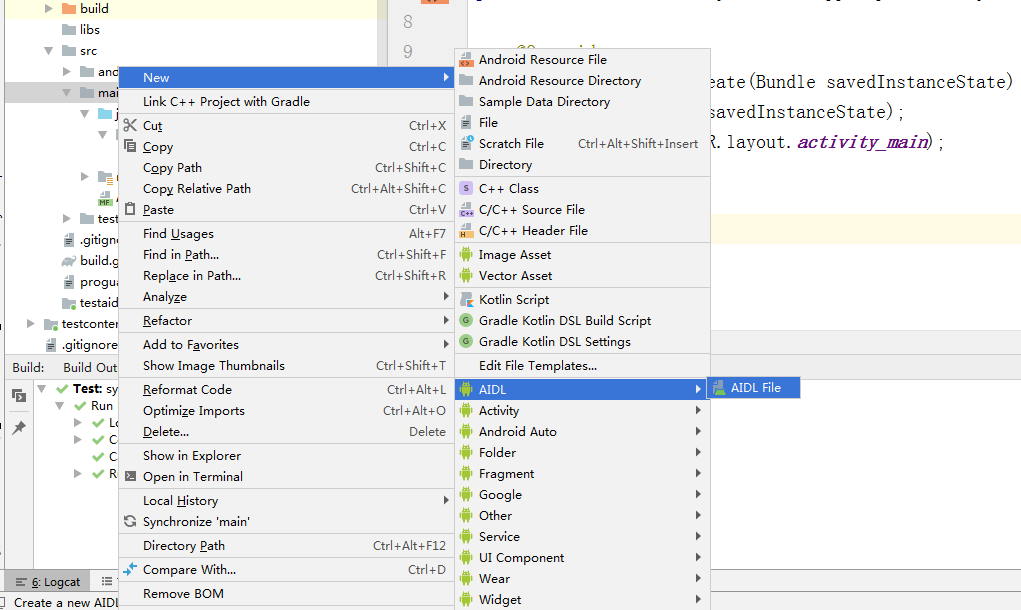
创建IGoodsManager.aidl,Goods.aidl, Goods.java代码如下:
IGoodsManager.aidl
package com.example.testaidl;
import com.example.testaidl.Goods;

// Declare any non-default types here with import statements

interface IGoodsManager {
    List<Goods> getGoodsList();
    void addGoods(in Goods goods);
}
Goods.aidl
package com.example.testaidl;

// Declare any non-default types here with import statements
parcelable Goods;
Goods.java
package com.example.testaidl;

import android.os.Parcel;
import android.os.Parcelable;

public class Goods implements Parcelable {
    private String goodsDesc;
    private double goodsPrice;

    public Goods(String goodsDesc, double goodsPrice) {
        this.goodsDesc = goodsDesc;
        this.goodsPrice = goodsPrice;
    }

    @Override
  public void writeToParcel(Parcel dest, int flags) {
        dest.writeString(goodsDesc);
        dest.writeDouble(goodsPrice);
    }

    @Override
  public int describeContents() {
        return 0;
    }


    public static final Parcelable.Creator<Goods> CREATOR = new Creator<Goods>() {
        @Override
  public Goods createFromParcel(Parcel source) {
            return new Goods(source);
        }

        @Override
  public Goods[] newArray(int size) {
            return new Goods[size];
        }
    };

    private Goods(Parcel in) {
        goodsDesc = in.readString();
        goodsPrice = in.readDouble();
    }

    @Override
  public String toString() {
        return "goods:" + goodsDesc + ", price:" + goodsPrice;
    }
}
结构如下所示: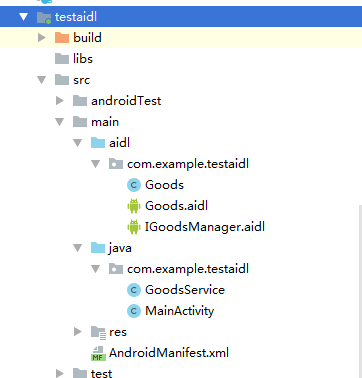
如果提示Duplicate Class,请确保Goods.aidl已按照上面代码修改,并且重新sync一下项目,再不行的话就clean再build一下
2.服务端Services
GoodsService.java:
package com.example.testaidl;

import android.app.Service;
import android.content.Intent;
import android.os.Binder;
import android.os.IBinder;
import android.util.Log;

import java.util.List;
import java.util.concurrent.CopyOnWriteArrayList;

public class GoodsService extends Service {
    private static final String TAG = "GoodsService";
    private CopyOnWriteArrayList<Goods> goodsList = new CopyOnWriteArrayList<>();

    private Binder mBinder = new IGoodsManager.Stub() {
        @Override
  public List<Goods> getGoodsList() {
            Log.d(TAG, "getGoodsList" + goodsList);
            return goodsList;
        }

        @Override
  public void addGoods(Goods goods) {
            Log.d(TAG, "addGoods " + goods);
            goodsList.add(goods);
        }
    };

    @Override
  public void onCreate() {
        super.onCreate();
        goodsList.add(new Goods("car1", 500.0));
        goodsList.add(new Goods("car2", 600.0));
    }

    @Override
  public IBinder onBind(Intent intent) {
        return mBinder;
    }
}
AndroidManifest.xml:
<?xml version="1.0" encoding="utf-8"?>
<manifest xmlns:android="http://schemas.android.com/apk/res/android"
  xmlns:tools="http://schemas.android.com/tools"
  package="com.example.testaidl">

    <application
  android:allowBackup="true"
  android:icon="@mipmap/ic_launcher"
  android:label="@string/app_name"
  android:roundIcon="@mipmap/ic_launcher_round"
  android:supportsRtl="true"
  tools:ignore="GoogleAppIndexingWarning">
        <activity android:name=".MainActivity">
            <intent-filter>
                <action android:name="android.intent.action.MAIN" />

                <category android:name="android.intent.category.LAUNCHER" />
            </intent-filter>
        </activity>
        <service android:name=".GoodsService"
  android:process=":mute">  // 开启多进程
        </service>
    </application>

</manifest>
3.客户端代码编写
MainActivity.java:
package com.example.testaidl;

import android.app.Activity;
import android.content.ComponentName;
import android.content.Context;
import android.content.Intent;
import android.content.ServiceConnection;
import android.os.Bundle;
import android.os.IBinder;
import android.os.RemoteException;
import android.util.Log;
import android.view.View;

import java.util.List;

public class MainActivity extends Activity implements View.OnClickListener {
    private IGoodsManager goodsManager;
    private boolean connected;
    private int id = 0;
    private static final String TAG = "MainActivity";
    private ServiceConnection coonection = new ServiceConnection() {
        @Override
  public void onServiceConnected(ComponentName name, IBinder service) {
            goodsManager = IGoodsManager.Stub.asInterface(service);
            connected = true;
        }

        @Override
  public void onServiceDisconnected(ComponentName name) {
            connected = false;
        }
    };

    @Override
  public void onClick(View v) {
        if (connected && goodsManager != null) {
            switch (v.getId()) {
                case R.id.add:
                    id++;
                    try {
                        Log.d(TAG, "addGoods");
                        goodsManager.addGoods(new Goods("new Goods" + id, 200.0));
                    } catch (RemoteException e) {
                        e.printStackTrace();
                    }
                    break;
                case R.id.get:
                    try {
                        List<Goods> goodsList = goodsManager.getGoodsList();
                        Log.d(TAG, "getGoodList:" + goodsList);
                    } catch (RemoteException e) {
                        e.printStackTrace();
                    }
                    break;
                default:
            }
        }
    }

    @Override
  protected void onCreate(Bundle savedInstanceState) {
        super.onCreate(savedInstanceState);
        setContentView(R.layout.activity_main);
        findViewById(R.id.add).setOnClickListener(this);
        findViewById(R.id.get).setOnClickListener(this);
        Intent intent = new Intent(getApplicationContext(), GoodsService.class);
        bindService(intent, coonection, Context.BIND_AUTO_CREATE);
    }
}
4.实现效果
客户端日志:
2020-02-14 15:31:19.778 22746-22746/com.example.testaidl D/MainActivity: getGoodList:[goods:car1, price:500.0, goods:car2, price:600.0]
2020-02-14 15:31:41.909 22746-22746/com.example.testaidl D/MainActivity: addGoods
2020-02-14 15:31:43.207 22746-22746/com.example.testaidl D/MainActivity: getGoodList:[goods:car1, price:500.0, goods:car2, price:600.0, goods:new Goods1, price:200.0]

服务端日志:
2020-02-14 15:31:19.778 22765-22778/com.example.testaidl:mute D/GoodsService: getGoodsList[goods:car1, price:500.0, goods:car2, price:600.0]
2020-02-14 15:31:41.910 22765-22777/com.example.testaidl:mute D/GoodsService: addGoods goods:new Goods1, price:200.0
2020-02-14 15:31:43.206 22765-22778/com.example.testaidl:mute D/GoodsService: getGoodsList[goods:car1, price:500.0, goods:car2, price:600.0, goods:new Goods1, price:200.0]
0条评论